![Logo Cargoboard.png]](https://help.cargoboard.com/hs-fs/hubfs/Logo%20Cargoboard.png?height=40&name=Logo%20Cargoboard.png)
How can I check my current status?
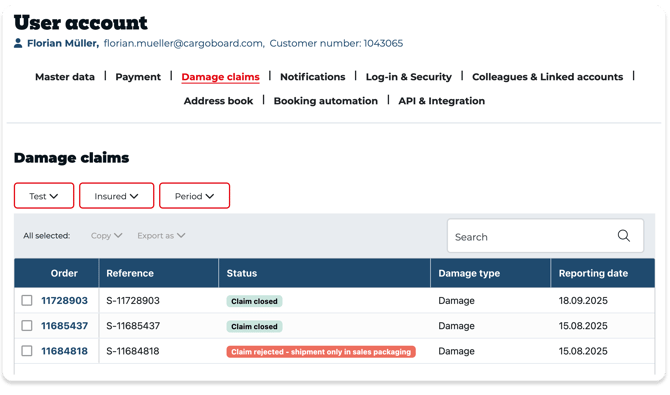
ou can check the progress of your claim at any time:
-
Log in to your Cargoboard account.
-
Open the “Damage Claims” section.
-
Select the relevant claim.
-
At the bottom of the page you will see the current status. Below that, you’ll find the steps completed so far and—if applicable—notes on any remaining to-dos.
Tip: If you have received an email from us, it usually contains a direct link to track your specific claim.
Below is a short explanation of the possible status messages within claim tracking.
1. Claim created
We have received your claim and recorded it in our system. If any documents are still missing, we will request them from you in the next step.
What you can do now:
- Check in claim tracking which documents have already been uploaded.
- Prepare the required documents (e.g., invoices, photos, delivery notes).
You can find an overview here:
-> Overview of required documents for a claim
2. Submit and review documents
In this phase, we ensure that all required information and documents are provided in full and are reviewed.
Typical status messages in this section::
-
Documents incomplete
-
Documents submitted in full
-
Documents under review
-
Documents incorrect / incomplete
-
Documents complete and correct
2.1 Documents incomplete
We have found that information or documents are still missing.
What you should do:
-
In your Cargoboard account, check the “Claim documents” area to see exactly which items are missing.
- As soon as we identify missing documents, we will send you an email with a detailed list.
-
Upload the missing documents directly there.
Nutzen Sie bei Fragen unsere Übersicht zu den benötigten Dokumenten:
-> Overview of required documents for a claim
-> How do I enter the claim amount, claim weight, and claim description?
-> How do I create a claim invoice?
2.2 Documents submitted in full
Your case is fully documented. Next, we will review your documents for content and plausibility.
You don’t need to do anything at this point unless we contact you with further questions.
2.3 Documents under review
We are now reviewing:
-
The damage description
-
The claim amount and weight
-
Invoices, receipts, and photos
2.4 Documents incorrect / incomplete
We have found an error in the submitted documents or information is still missing (e.g. unclear amounts, missing line items on the invoice).
What you should do now:
-
Read the email with our specific feedback carefully.
-
Adjust your documents or details accordingly.
-
Upload the corrected documents again.
3. Claim under assessment
Once your documents are complete and consistent, the claim moves into the substantive assessment phase. This is partly handled by our team and partly by our insurance partners.
Typical status messages in this phase:
-
Claim under assessment
-
Documents forwarded to insurer
-
Claim received by insurer
-
Claim being processed by insurer
-
Insurer requests additional documents
3.1 Claim under assessment
We are reviewing your claim and whether the requested compensation is reasonable, for example:
-
Does the claimed amount match the submitted invoices?
-
Are the extent of damage and packaging clearly documented and understandable?
-
Are all required documents available?
You usually don’t need to do anything here. If we have any questions, we will contact you by email.
3.2 Documents forwarded to insurer
Your claim, including all relevant documents, has been forwarded to the insurer.
The insurer will now carry out the further evaluation. You will receive updates both by email and in the “Damage Claims” section of your Cargoboard account.
3.3 Claim being processed by insurer
The insurer is currently reviewing the case.
Possible status messages:
-
Claim received by insurer
-
Claim being processed by insurer
-
Insurer requests additional documents
If additional documents are required, you will receive an email with clear instructions on what is still needed.
4. Claim closed
At the end of the process, your claim will be closed. This may happen either through settlement or rejection.
Typical status messages in this phase:
-
Claim settled
-
Claim settled (corrected claim invoice)
-
Claim settled – goodwill payment
-
Claim rejected
-
Other specific rejection reasons (e.g., not packaged for safe transport, reporting deadline exceeded)
4.1 Claim settled
We have settled your claim.
We will provide the details (e.g., amount, payment method) in a separate email.
If you have any questions, simply reply to that email or contact our Claims Team.
4.2 Claim settled (corrected claim invoice)
In some cases, a corrected claim invoice is required before we can pay out (e.g., incorrect amounts or missing information).
What you should do:
-
Adjust your invoice according to the notes in our email.
-
Create a new, corrected claim invoice.
-
Upload it again in claim tracking or send it to us directly by email.
You can find instructions on how to create a correct claim invoice here:
-> How do I create a claim invoice?
4.3 Claim rejected
In some cases we unfortunately have to reject a claim. Typical reasons include:
-
the shipment was not packaged to be transport-safe
-
the shipment did not comply with our Terms and Conditions
-
the statutory reporting deadline was exceeded
-
there is only a delivery receipt without any damage note
In the rejection email, we explain the specific reason in detail.
If you do not understand the decision, please contact our customer service and provide your claim number.
Questions about your claim
If you have any questions about your current claim, please feel free to contact us at claim@cargoboard.com.
You can find more information on how to ensure your claim is processed as smoothly as possible here.